Export audio
In Sequence, after uploading and editing your video using our powerful AI tools, you have the option to export just the audio from your edited video.
Why Export the Audio?
Exporting the audio from your edited video can be useful for several reasons:
- Audio-Only Content: Create podcasts, voiceovers, or other audio-only content.
- Reuse in Other Projects: Use the edited audio in different projects without needing the video component.
- Flexibility: Allows for easier integration into various platforms that may require or benefit from audio files separately.
Steps to Export the Audio
Navigate to Your Project
- Log into your Sequence account.
- Select the space and folder where your project is located.
- Open the specific project that contains the video you have edited.
Edit Your Video
Before exporting, make sure you have completed all desired edits:
- Apply AI Voice: Change or apply AI-generated voices to your video.
- Edit Text Chunks: Modify scripts and text chunks as needed.
- Preview Changes: Review your video with the new edits to ensure everything is as desired.
Locate the Original Video
- In your project dashboard, find the section where your uploaded video is displayed.
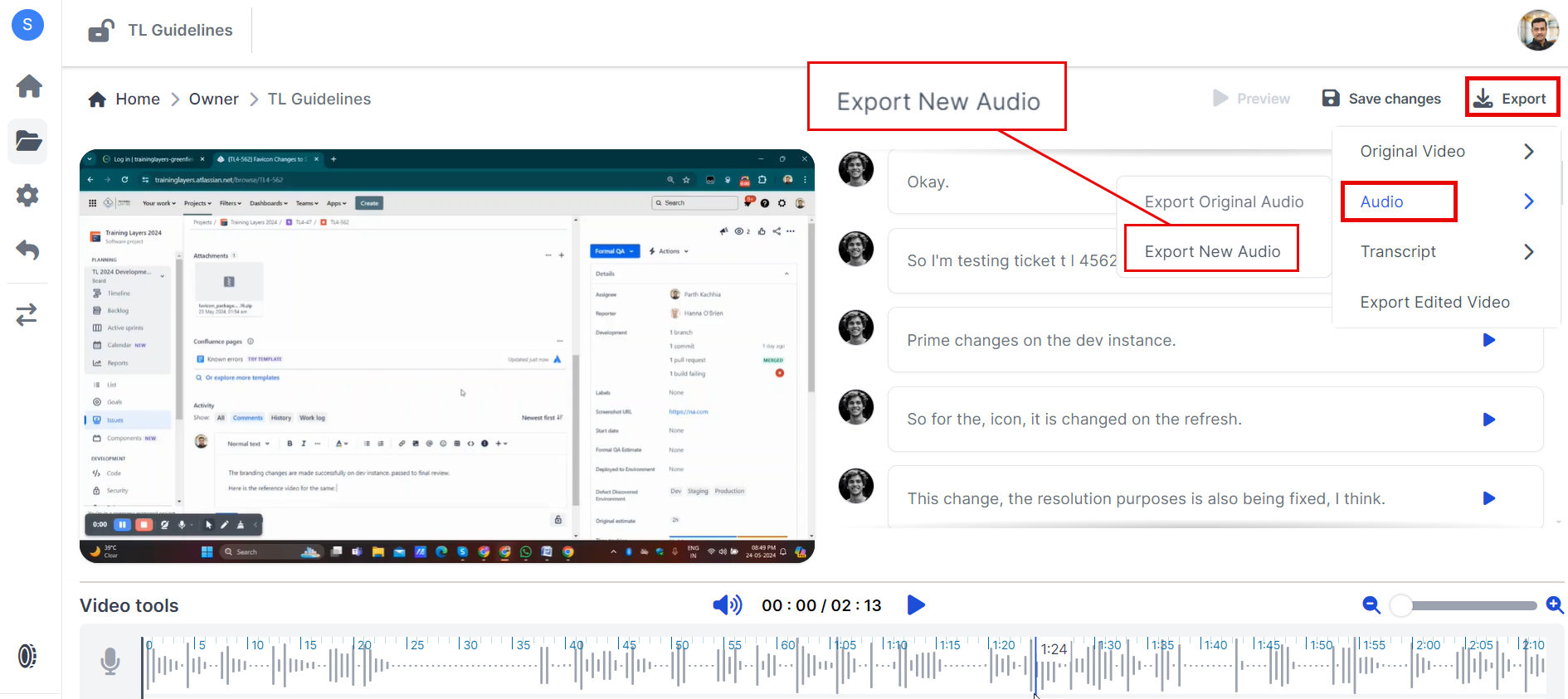
Export the New Audio
- Look for an option labeled "Export New Audio" > Export button.
- Click on this option to initiate the download of your original audio file without video.
Important Notes
- The exported audio will include all edits made within Sequence, such as applied AI voices and modified text chunks.
- Ensure all edits are finalized before exporting, as changes made after exporting will require another export process.
- While this guide focuses on exporting audio, remember that exported videos will be in MP4 format if you choose to export them instead.
Troubleshooting
If you encounter any issues while exporting your audio, here are some common solutions:
Export Issues?
- Ensure you have a stable internet connection during the export process.
- Check if there is sufficient storage space on your device for downloading the file.
File Not Found?
- Make sure you are in the correct project and looking at the right video file.
Need Help?
If you need further assistance with exporting your audio, feel free to reach out to our support team via support@adoptsequence.com.